Showing posts with label global collaboration. Show all posts

Thursday, May 4, 2017

Flipgrid is Flipping Awesome!

Sometimes a technology tool comes along that you know will drastically change the way kids collaborate, create, and communicate! I feel this way about Google Classroom (well all the Google Apps for Education, actually) and Seesaw, and now I am adding Flipgrid to that prestigious list.

“Flipgrid is a video discussion community for your classroom that supercharges your students’ voices. You add the topics, your students respond with short videos, and everyone engages!” (Flipgrid website)

flipgrid.PNG

Like Seesaw, Flipgrid is extremely user-friendly for both the teacher and the students. Because the video responses are limited to a minute and a half, students are able to practice being concise and articulate, while teachers don’t feel overwhelmed viewing the responses from an entire class. Flipgrid allows all students, especially those who struggle with expressing themselves via written language, the opportunity to share ideas, thoughts, and newly gained knowledge. Also, Flipgrid is able to be used on all modern browsers, desktop, Chromebook, iPhone, iPad, and Android devices.

How many times have you spent hours leaving penned comments and suggestions on students’ written work only to have them immediately shove the paper into their desks or backpacks (or better yet, the trash can)! Today’s students rely on visual and auditory messages to gain meaning in their lives. Think about Snapchat, Instagram, and the other social networking platforms that they use profusely throughout the day. As a teacher, Flipgrid can be used as a powerful formative assessment tool, allowing you to provide meaningful feedback using a modality today’s students desire.

Because students are able to view each other’s responses, Flipgrid is also a great way for our kids to practice digital citizenship, critical thinking, and gain new insight, understanding, and perspective (something sorely needed these days). In the teacher dashboard you have the ability to allow students to comment on each other’s responses or just allow viewing. Flipgrid also makes it easy to help our students become global learners through their global connection portal!

global.PNG

Flipgrid is an awesome tool for all grade levels and all subject areas. Math teachers are using it to have students explain their problem solving, ELA teachers are using it for global book discussions, science teachers are having students describe their lab findings, music teachers are having students share short performances, the possibilities are endless! This week at Southern Pines Elementary, several 3rd grade teachers used Nearpod lessons to teach students about the differences between saltwater and freshwater ecosystems. Then they had their students choose three things they wanted to share from their notes (Venn Diagrams) using Flipgrid.

IMG_4175.JPGIMG_4174.JPG

The students used their Chromebooks and the entire class was finished recording within five or six minutes. The teachers now have rich formative information they can use to plan tomorrow’s follow up lesson, the class has a collection of interesting facts, and the students enjoyed quickly sharing what they had learned. You can visit the grid HERE.

kohut flipgrid.PNG

I encourage you to give Flipgrid a try! If you are on Twitter @flipgrid is developing an enormous, energetic following. Make sure you check out the #flipgridfever hashtag to get amazing ideas on how other teachers are using this awesome tool! You can also check out a new grid HERE they’ve created where teachers (even you!) can add new ideas throughout the month of May!

Your DIF will be happy to get you started or model a lesson using Flipgrid, just ask!

Here’s to trying new things to empower our kids!

Kim

Thursday, October 30, 2014

Student Feature - Global Read Aloud at Highfalls

For this week's Student Feature, I would like to showcase a middle school student from Highfalls in Robbins, NC.  Isaiah is a sixth grade student in Mrs. Sarah Holden’s class.  Isaiah’s class has been taking part in the Global Read Aloud and has connected with classrooms in Ecuador and Canada to collaborate about a book, The Fourteenth Goldfish by Jennifer L. Holm.  Below you can read Isaiah’s account of his experience during this collaborative opportunity.  Isaiah will be speaking about his experiences during this class project at the upcoming Board of Education meeting on November 10.

“My 6th grade class has been reading The 14th Goldfish as part of the Global Read Aloud.  We have connected with a 7th grade class from Ecuador in many different ways.  This has been an amazing experience for me.
Global Read Aloud is a way to take a book and use it to connect students with other students from around the world.  In doing this it helps us to interact with kids that we would have never met without this experience.  Through this we can learn about new cultures in ways that we have never done before.
During this experience, my class has connected in many different ways with a 7th grade class from Ecuador.  To begin with, we did a Mystery Skype with them.  We asked them questions and tried to figure out where they were from.  They also asked us questions.  After a few guesses they figured out that we were from North Carolina first.  Then we guessed a few different places, but we finally figured out that they were from Ecuador.   Then we connected with the same class on Edmodo.  We typed a little bit about ourselves and shared this with them and they did the same.  We were able to respond back to the students.  As a class, on Twitter, we answered questions about The 14th Goldfish and shared pictures about our experience.  Finally on Kidblog Mrs. Holden asked us different questions and we answered them.
Before we Skyped I was a little nervous because I never Skyped before.  But when we did it, it was a fun, interesting, and exciting experience.  It was fun to connect with people from another place in the world and to learn things about them .  It was cool that there was a girl in the class that was from North Carolina. My overall experience has been exciting because it is fun to connect with people from other places.  I can’t wait to see what we do next!”       - Isaiah, Highfalls Elementary 6th Grade

Monday, June 16, 2014

Maintaining Assessment Integrity in the 1:1 Environment


Maintaining Assessment Integrity in the 1:1 Environment

I continue to hear the notion that web enabled devices and / or 1:1 devices undermine the integrity of our classrooms and assessments. The truth is that it is no more in danger than at any other point. The strategies used by students looking to get over on teachers has changed; but if they can adapt, so can we. I want to show you a couple of quick tips & tricks to tackle some of your usual suspects:


Cheating
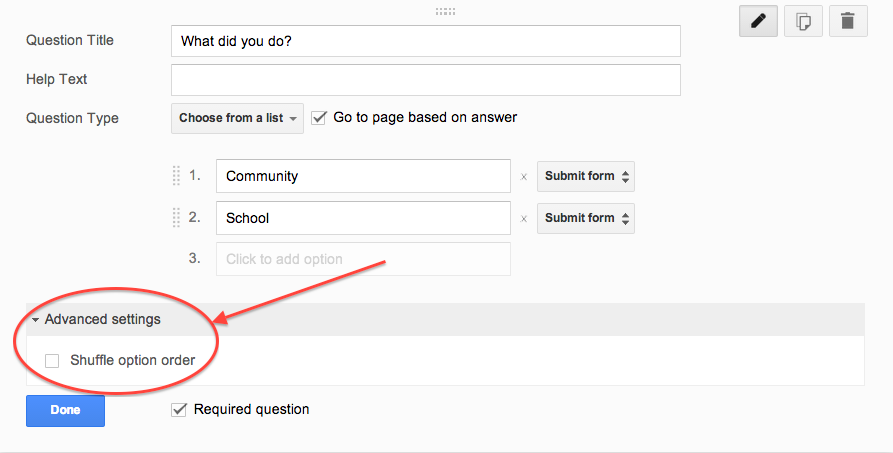
Cheating will be attempted in the standard, Honors, and the Advanced Placement version of any course. It is difficult to catch but easy to vex. If you are using Google Forms (which I recommend) to conduct M/C or T/F quizzing, this has a simple fix. After you write a question click “advanced setting” above the “Done” button. Check the box “Shuffle Option Order” & you’re all set.


Screen Shot 2014-06-16 at 4.35.55 PM.png


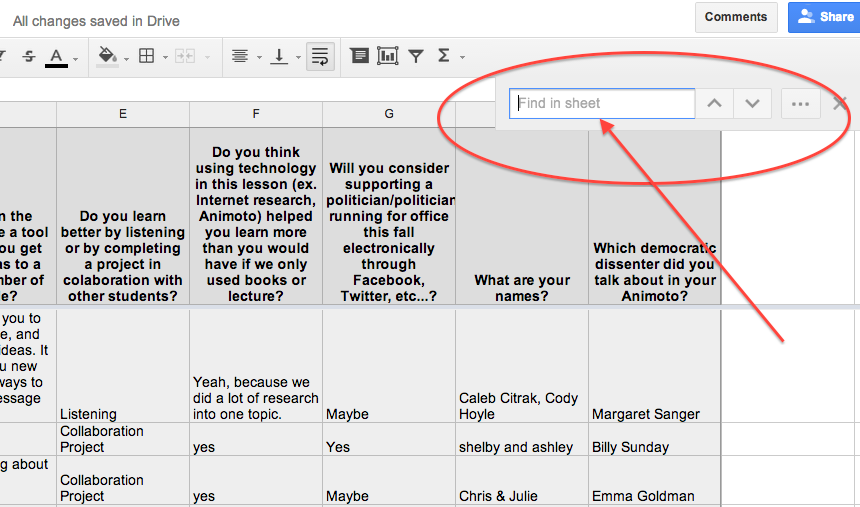
For short answer text questions you can go into your Google Sheet and pull up your suspect’s answers, use the Ctrl F feature to search for similar student responses. Confront them cautiously because your evidence is only circumstantial. It may be enough just to poke them with a little joking comment to make them understand you are on to them. Redirection of behavior is our goal. Getting caught is a teachable moment.


Screen Shot 2014-06-16 at 4.37.53 PM.png


Plagiarism

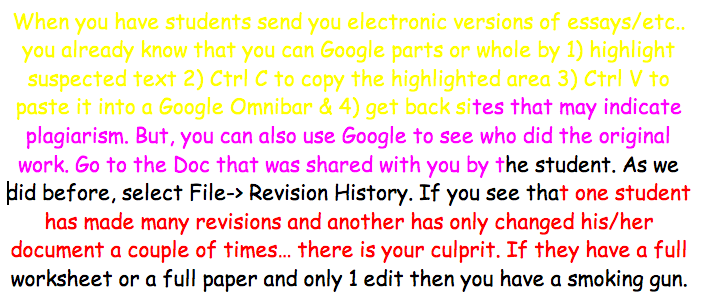
When you have students send you electronic versions of essays/etc.. you already know that you can Google parts or whole by 1) highlight suspected text 2) Ctrl C to copy the highlighted area 3) Ctrl V to paste it into a Google Omnibar & 4) get back sites that may indicate plagiarism.
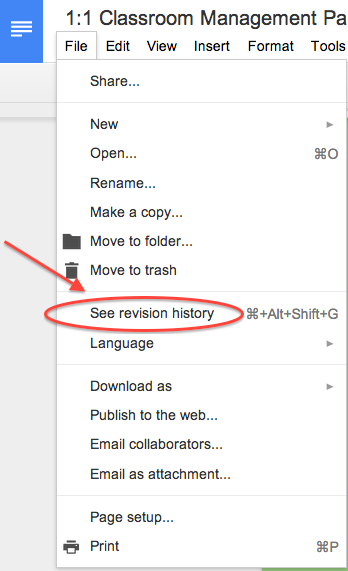
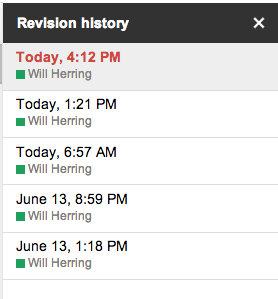
But, you can also use Google Revision History to see who did original work. Go to the Doc that was shared with you by the student. As we did before, select File-> Revision History. If you see that one student has made many revisions and another has only changed his/her document a couple of times… there is your culprit. If you have a really difficult situation between students you can go as far as to see the timestamped revision in which the actual questioned portion is contained. 

It is probably needless to say that if they have a full worksheet or a full paper and only 1 edit then you have a smoking gun.


Screen Shot 2014-06-16 at 4.09.11 PM.png


The Worst Partner EVER; (AKA: UN-collaborator)


We’ve all listened to students complain that they did more work than any other member & it’s UNFAIR! One easy way to check for participation is to have students collaborate in a Google Doc using different color text. You can eyeball the doc to see who is doing what & if a dispute arises use the revision history feature to see if someone has altered another student’s work. To see the “Revision History” of any Doc click on “File” -> “Revision History”


Screen Shot 2014-06-16 at 4.54.54 PM.png


Screen Shot 2014-06-16 at 4.09.11 PM.pngScreen Shot 2014-06-16 at 4.12.19 PM.png

Keep in Mind

The cat and mouse game is centuries old. The Chromebooks are just a new field of play. Don’t spend too much effort building a better mousetrap. Instead spend your time creating challenging and interesting lessons with authentic assessment items that incorporate student product generation and publication. Embrace the notion that students have access to any fact based knowledge in the history of man in their pockets and ask them to DO something with it!


Add a teacher pro-tip in the Comments section below if you have even more ideas

Will Herring
MCS DIF

Tuesday, June 3, 2014

Stormboard - Online Brainstorming and Collaboration Platform

So it's the last few days of school and you're interested in trying out a new digital tool in preparation for next year. Here's a suggestion: Stormboard


Stormboard is a free tool for real-time collaboration, brainstorming, and mind-mapping. Using Stormboard, users can create an unlimited amount of "storms" from a bank of education templates (Character Map, Compare & Contrast, Conflict Map, Reading & Analyzing Non-Fiction, etc.) or start from scratch with a blank brainstorming wall. Once the storm is created, users can invite up to 5 collaborators via email, providing the link to the storm, or giving out the storm ID & key. 


Your storm can include color-coded sticky notes, images, videos, and sketches. Users can utilize the chat option to communicate within the storm. The drag-and-drop process makes it very easy to edit the storm. A couple of the nice features of Stormboard is the ability to vote on the ideas on the storm (each user gets 10 votes to prioritize the sticky notes) and the option of commenting on each item on the storm so that your collaborators can give feedback on the ideas. You can retrieve reports from your Stormboard in a variety of formats. 

The Google sign-in feature makes this an easily accessible tool for your Chromebook users. The numerous literacy templates are great if you're thinking about going paperless. 

*Free education accounts until July 31, 2014 which enables unlimited users per storm*


Wednesday, May 21, 2014

Global Connections on Chromebooks with ePals

One of the absolute best tools I've encountered over the years to increase global awareness and collaboration across the world is ePals (located at http://epals.com).


"ePals" are what the name implies - Electronic Pen Pals.  But the service offers so much more (and all free!).  With ePals, you can connect with classrooms from over 200 countries all over the world, whose students speak 136 different languages and range in age from preschool to college age.  

Once you're logged in as a teacher and have completed your class profile, you can easily search for and connect with classes through an intuitive process.  As you can see, it's very easy to narrow down your search so you can start looking at profiles that fit your classroom's exact needs. 

The three types of collaboration that are available are simple email exchanges (like a traditional pen pal), video chats, and collaborative project work spaces.  These three can certainly be combined as you grow more comfortable with your ePals.


A sample profile


Each classroom profile is created by the teacher and explains the types of connections they are hoping to make.


Finally, another great service that ePals provides are message forums for teachers and students alike.  Here, students can pose and answer questions to the global community that are interesting or relevant to their lives. Here, you'll see students from all over the world discuss things like their favorite foods, favorite books, favorite movies, as well as globally important issues such as gun control, women's roles, and cloning. It's great to see students read through and contribute their own thoughts and ideas about topics that are highly relevant to their lives.  It can be quite an eye-opener for many students who may otherwise never get an opportunity to communicate with kids their age from around the globe.


Here's to hoping you take the dive and expose your students to the global community in a way that is very accessible and "real."  Try ePals!