Showing posts with label education. Show all posts

Monday, October 24, 2016

Halloween is coming but Mrs. Futral isn't afraid

Integrating technology can be scary. 


Technology is constantly changing. It takes a lot of patience and perseverance. Especially when the computer, iPad, app, robot, chromebook, website (you see where I am going with this) is not working like it should. It is easy to become frustrated. But through it all, Johnna Futral knows that integrating technology is worth the risk. I have worked with Johnna over the past three years and she has become one of my closest allies in the world of digital learning. I know that if there is something new that I would like to take for a test drive I can approach Johnna and she will be eager to give it a shot. Not only is she open to my suggestions, she's an advocate for the benefits of digital learning. I wanted to share her teaching pedagogy that includes using technology to enhance her instruction so that other educators may see that the rewards are worth the risks that you take when you step out of your comfort zone. Here's a piece of my interview with another one of Moore County's finest:


Question: How long have you been a teacher in Moore County Schools?
Answer: This is my eighteenth years teaching. All in Moore County Schools. I’ve taught second grade for seven years, Kindergarten for seven years and two years in fourth grade. I also worked as an assistant for two years.

Q: How would you describe your teaching style?
A: My teaching philosophy has always been that high expectations lead to high achievers. I like a lot of movement in the classroom. I like to change things on a whim. I’d like to say that I’m organized enough that I’m effective but if something isn’t working I like to change it on the fly. I’d say I’m a little bit of a “fly by the seat of my pants” kind of teacher. It depends on what the kids need. What I think when I’m planning may be different than what happens when I’m actually teaching. I also like a lot of creative in the classroom. I like to integrate arts and science because the kids enjoy it and I bring that passion so then the kids get excited.

Q: You often integrate technology in your lessons. How does technology enhance your instruction?
A: For one thing, when the kids are using technology they are a lot more engaged compared to when they’re talking to their classmates. I think it has a lot to do with the world we’re living in. It enhances teaching when you bring in something they're familiar with. 21st century learners must be fluent with technology to be able to function as an adult. Showing students those skills of creating, collaboration, and publishing prepares them for what’s to come in their future. They still need to be able to talk through their thinking as well. That way we don’t take out the personal connection part.

Q: What are some of your favorite lessons that included technology?
A: I especially enjoyed the solar oven engineering lesson where our students created a plan, then made and tested, as well as improved a way of using the energy from the sun to make s’mores. I also enjoyed the Lego robotics lessons where our students created and programed robots that supplemented math lessons in measurement and comparing numbers. You can see the kids enjoy these lessons and you know the content will stick with them because of how much they enjoy it. Even though some of those lessons are harder to prepare for, it turns out being some of the best lessons. Once we got out there to see that something they created was successful when the sun had melted our chocolate...they’ll remember that forever..


Q: What would you say to a teacher who may be reluctant to use technology with their students?
A: I would say to utilize your resources. If your Digital Integration Facilitator is offering to give you help, you should take advantage of that resource because if you’re not comfortable with technology, your DIF is so you’ll be able to step outside of your comfort zone and then you’ll grow as a teacher. You are more likely to try something new when you’re working with a DIF. Until I see it, I don’t understand how it works. The only way you’re growing to grow as an educator is to step outside of the box of comfort. No one is going to grow until they take risks. Just like we tell our students. I often find that if I do take a risk and fail it’s a good lesson for my students as well. You teach them perseverance and not to give up with some things are hard.

Q: Does your principal affect your motivation or desire to use technology?
A: No. I think he’s very tech savy. It’s something that I do on my own because I think it’s beneficial.

Q: You’re an inspiration to many people, including myself, what inspires you?
A: From the time I was a small child I knew I wanted to be a teacher. I was inspired at a young age by my kindergarten teacher. I don’t know exactly what it was but she was a huge inspiration for me. I even did an internship where I went back into her classroom and worked with her.  My children also inspire me. My colleagues inspire me. I get inspired by other educators. I think that my daughter inspires me and that I inspire her as well as my students. They’re so much love in a school building that is enough in itself to be inspiring. I like to have fun. I don’t like to do things like in the olden days. I like to be creative and I think teaching allows me to do that.

Q: What is your favorite part about being a teacher?

A: I think my favorite part is the kids and how much they love you. It’s like having a classroom full of your own children that you mold and shape. Even though you send them home at the end of everyday you still think about them. Why else would you be a teacher? It’s about the kids. I like to see them excited about things. Like today, when they were building their robots today that’s something they were excited about.


This is Mrs. Futral's first year at Cameron Elementary School and they are beyond lucky to have such an amazing teacher. If I had kids, I would love for them to have her as their teacher. She is a phenomenal educator and I absolutely love collaborating with her.

Monday, June 16, 2014

Maintaining Assessment Integrity in the 1:1 Environment


Maintaining Assessment Integrity in the 1:1 Environment

I continue to hear the notion that web enabled devices and / or 1:1 devices undermine the integrity of our classrooms and assessments. The truth is that it is no more in danger than at any other point. The strategies used by students looking to get over on teachers has changed; but if they can adapt, so can we. I want to show you a couple of quick tips & tricks to tackle some of your usual suspects:


Cheating
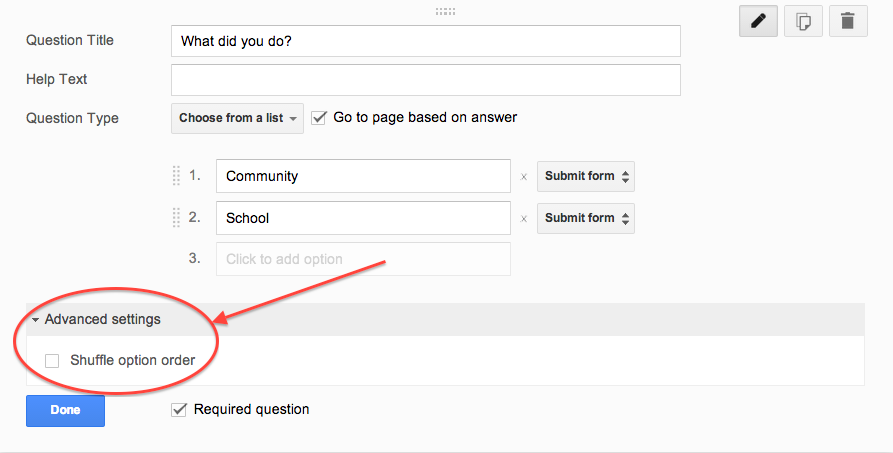
Cheating will be attempted in the standard, Honors, and the Advanced Placement version of any course. It is difficult to catch but easy to vex. If you are using Google Forms (which I recommend) to conduct M/C or T/F quizzing, this has a simple fix. After you write a question click “advanced setting” above the “Done” button. Check the box “Shuffle Option Order” & you’re all set.


Screen Shot 2014-06-16 at 4.35.55 PM.png


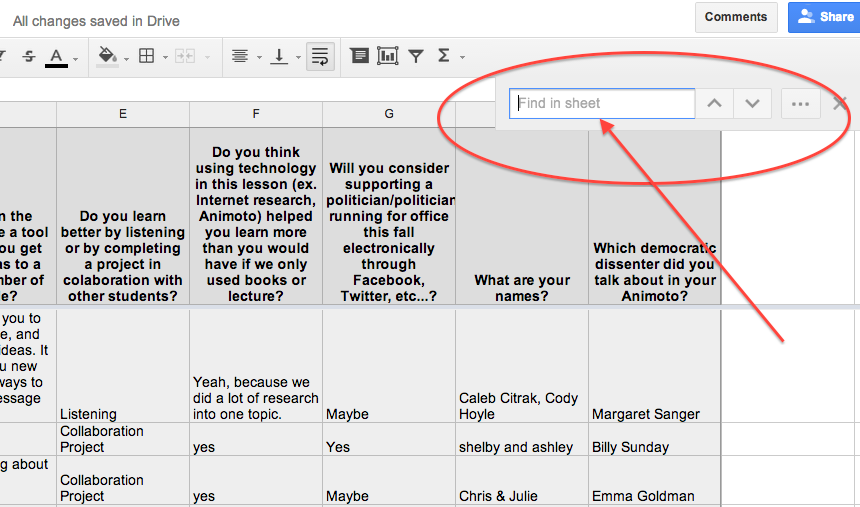
For short answer text questions you can go into your Google Sheet and pull up your suspect’s answers, use the Ctrl F feature to search for similar student responses. Confront them cautiously because your evidence is only circumstantial. It may be enough just to poke them with a little joking comment to make them understand you are on to them. Redirection of behavior is our goal. Getting caught is a teachable moment.


Screen Shot 2014-06-16 at 4.37.53 PM.png


Plagiarism

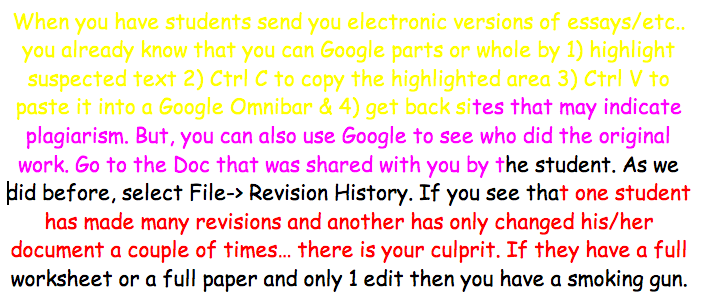
When you have students send you electronic versions of essays/etc.. you already know that you can Google parts or whole by 1) highlight suspected text 2) Ctrl C to copy the highlighted area 3) Ctrl V to paste it into a Google Omnibar & 4) get back sites that may indicate plagiarism.
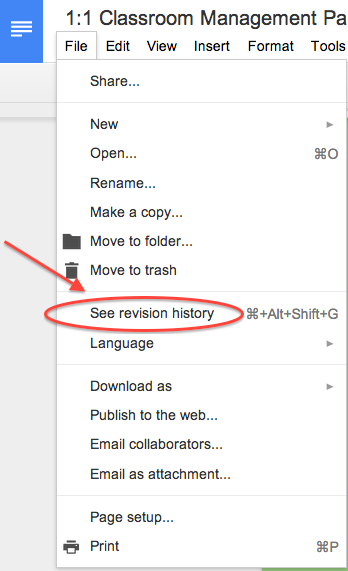
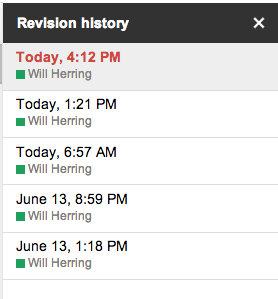
But, you can also use Google Revision History to see who did original work. Go to the Doc that was shared with you by the student. As we did before, select File-> Revision History. If you see that one student has made many revisions and another has only changed his/her document a couple of times… there is your culprit. If you have a really difficult situation between students you can go as far as to see the timestamped revision in which the actual questioned portion is contained. 

It is probably needless to say that if they have a full worksheet or a full paper and only 1 edit then you have a smoking gun.


Screen Shot 2014-06-16 at 4.09.11 PM.png


The Worst Partner EVER; (AKA: UN-collaborator)


We’ve all listened to students complain that they did more work than any other member & it’s UNFAIR! One easy way to check for participation is to have students collaborate in a Google Doc using different color text. You can eyeball the doc to see who is doing what & if a dispute arises use the revision history feature to see if someone has altered another student’s work. To see the “Revision History” of any Doc click on “File” -> “Revision History”


Screen Shot 2014-06-16 at 4.54.54 PM.png


Screen Shot 2014-06-16 at 4.09.11 PM.pngScreen Shot 2014-06-16 at 4.12.19 PM.png

Keep in Mind

The cat and mouse game is centuries old. The Chromebooks are just a new field of play. Don’t spend too much effort building a better mousetrap. Instead spend your time creating challenging and interesting lessons with authentic assessment items that incorporate student product generation and publication. Embrace the notion that students have access to any fact based knowledge in the history of man in their pockets and ask them to DO something with it!


Add a teacher pro-tip in the Comments section below if you have even more ideas

Will Herring
MCS DIF

Thursday, May 22, 2014

Create Your Own Classroom Posters!


Create Your Own Classroom Posters!

   As classroom teachers and administrators, we know how expensive decorative supplies and programs can be. With new technology, it is possible to create your own, personalized, classroom posters. These posters can state your class motto, school pledge, or favorite quote. 


   These customizable posters can be created at recitethis.com. Simply type in your word, quote, or statement and choose a theme.

    
      After selecting your desired poster template, you are ready to share, download, and eventually print. After just a few easy steps, your classroom will be transformed into a unique, personalized, learning environment.


Happy designing!
~Deanna Spizzirri

Wednesday, May 21, 2014

Global Connections on Chromebooks with ePals

One of the absolute best tools I've encountered over the years to increase global awareness and collaboration across the world is ePals (located at http://epals.com).


"ePals" are what the name implies - Electronic Pen Pals.  But the service offers so much more (and all free!).  With ePals, you can connect with classrooms from over 200 countries all over the world, whose students speak 136 different languages and range in age from preschool to college age.  

Once you're logged in as a teacher and have completed your class profile, you can easily search for and connect with classes through an intuitive process.  As you can see, it's very easy to narrow down your search so you can start looking at profiles that fit your classroom's exact needs. 

The three types of collaboration that are available are simple email exchanges (like a traditional pen pal), video chats, and collaborative project work spaces.  These three can certainly be combined as you grow more comfortable with your ePals.


A sample profile


Each classroom profile is created by the teacher and explains the types of connections they are hoping to make.


Finally, another great service that ePals provides are message forums for teachers and students alike.  Here, students can pose and answer questions to the global community that are interesting or relevant to their lives. Here, you'll see students from all over the world discuss things like their favorite foods, favorite books, favorite movies, as well as globally important issues such as gun control, women's roles, and cloning. It's great to see students read through and contribute their own thoughts and ideas about topics that are highly relevant to their lives.  It can be quite an eye-opener for many students who may otherwise never get an opportunity to communicate with kids their age from around the globe.


Here's to hoping you take the dive and expose your students to the global community in a way that is very accessible and "real."  Try ePals!