Showing posts with label Publishing. Show all posts

Wednesday, May 10, 2017

Traci Keith - A Teacher's Teacher

Some people were born to be educators. You can tell the moment you step into their classroom that the students who have the privilege of being in this room are in for an amazing year. There are lots of teachers that come to mind when I think of natural-born educators, one of which is Traci Keith, a fifth grade teacher at Cameron Elementary School. She has all the things a principal would look for in an exceptional teacher. She’s creative, passionate, knowledgeable, and her students love her! She creates a learning environment where her students are set up for success. A lesson that stands out for me is when her class participated in a novel study and the setting of the story was a cafe. Guess what the students walked into the first day of the novel study…...a cafe. Yep, she decorated her entire classroom like a cafe. You’ll find Miss Keith doing things like this all the time to get her students excited about their learning. Another amazing learning opportunity that Miss Keith created was when her students were studying the industrial revolution. This may not come across as the most engaging unit of study as a student, so Miss Keith and I collaborated on a project where her students would bring the inventions from the industrial revolution to life using www.tinkercad.com and our 3D printer!


Students were assigned an invention that is associated with the industrial revolution, they had to research this creation and explain how it made life easier for people during this time frame. Once this was completed, students hoped on their Chromebooks and created a model of their invention using the Tinkercad website. What better way could a teacher bring their lesson to life than to have her students actually re-create the inventions that they are studying! Then, once her students completed their models, we printed them with our Dremel 3D printer! Take a look at some of their models:

Paddle boat

Steamboat

Telegraph

I always enjoy picking the brain of teachers who I look up to, so that I can hopefully take something back from them and add it to my toolbox. Take a look at what Miss Keith shared with me when I sat down to interview her and hopefully you’ll be able to take something from this phenomenal teacher:


Question: What allows you to be able to take risks with your students?
Answer: I think I take these risks because sometimes when students do things they’ve always done in the past, it’s boring and it becomes monotonous. If I take a risk and do something new with them, it becomes a learning process for both of us where I learn to be a better teacher and they learn to be a more creative learner or think more critically.


Q: How would you describe your teaching style?
A: The best way to describe it would be flexible because of the fact that every day is different and every learning style is different. You can plan as many avenues as possible but there will always be outcomes that happen that you can’t predict so you have to be ready to change at the drop of a hat.


Q: Where do you start when you are planning a lesson that includes technology?
A: For me, it starts with what I would do if I didn’t have technology and then how I can turn those things into digital pieces. For example, in vocabulary in reading instead of having them make vocabulary flashcards they used digital flashcards using Quizlet. Also, a lot of project-based learning is easier because there are more options in the digital world. It adheres to what the students like because they’re living in a world of technology.


Q: What are some of your favorite technology tools that are your “go to” tools for digital integration?
A: I use vocabulary.com a lot. I can assign the vocabulary words and then they practice those words in a number of different ways. I like Google Classroom because I can post different types of assignments and they all get turned into the same place. I can assign anything from Google Slide projects, to webquests, to Classworks reading or just give them link to check out when we’re studying a content specific area.


Q: You’re an inspiration to many people, including myself, what inspires you?
A: I think our whole staff here at Cameron because we have a staff that has tons of different teaching styles and they all make their specific teaching styles work for them. And they all have the best interest of their students in mind which inspires me to think outside of the box because what’s really important is what they learn and how they learn it. And the students, of course because honestly there’s nothing better than completing an assignment or project and seeing the light bulb go off and they finally get it.


Q: What is your favorite part about being a teacher?
A: Having fun with the kids. The best part about my job is being able to experience things with them and see their reactions when they learn something new. While lots of the things we do in class, I may have done before, they are brand new for my students so it creates a new experience for all of us and a bonding experience that helps us form relationships that last for years to come.

It truly is a pleasure to work with teachers like Miss Keith. She's always looking for ways to make the learning meaningful for her students. She has a fantastic rapport with her students and her colleagues. Thank you Miss Keith for everything that you do for your students at Cameron Elementary School.
#camscotsproud

-Clint

Tuesday, March 22, 2016

Pinecrest Students Decide Who We Can Trust in 2016

March 22nd, 2016


Kasich_J-cropped.jpg
vqLFytq3.jpg
Trump.jpg
1wPBxxKw.jpg
g4a6P9Yh.jpg
svmwnMOr.jpg


The 2016 presidential election season is in full swing. It is at the forefront of the news and our students’ minds. Accusations are flying freely  and the decorum of the candidates is as low as we have seen since the 1830’s.

Shawna Farbotnik and Emma Robinson, both Civics and Economics teachers at Pinecrest High School in Southern Pines, wanted their students to critically analyze the claims of the candidates. Using the site, Politifact as a model, Shawna, Emma and I created a lesson that required students to identify six specific claims by one of the candidates, search for confirming or conflicting evidence using only reputable sources, and then present their work in front of a green screen.

The kids did a great job with their claims and research. The green screen work and editing threw us for a loop but they turned out well and we’ll know how to do a little better next time. Here is the link to our work, the lesson plan, and our rubric. As with all things, these are works in progress. Feel free to use in your room and if you figure something out send us the tip!

button.png
~~~~~~~~~~~~~~~~~~~~~~
Images
https://blogger.googleusercontent.com/img/b/R29vZ2xl/AVvXsEjx82fzflnLnOaBvrUSuYGAIYj5R5rkJjsc1pzqmfPAO8rrF0wapCfTKKuAKzM6nuYnoynOikHSR8EB7xC4jaRB_YsQvgKo4-qVnrO7WwwXyRnTXF_PGZHgTVU-hxoknzsDTHqKEHcJVpmX/s1600/Trump.jpg
https://pbs.twimg.com/profile_images/617770216412442625/vqLFytq3.jpg
http://fightbigmoney.com/images/scorecard/Kasich_J-cropped.jpg
https://pbs.twimg.com/profile_images/677279682283200513/1wPBxxKw.jpg
https://pbs.twimg.com/profile_images/618647359380000769/g4a6P9Yh.jpg
https://pbs.twimg.com/profile_images/589003774624079873/svmwnMOr.jpg

Will Herring
Digital Integration Facilitator
MCS, UPHS, PHS
@willherrin16


Thursday, May 29, 2014

Teaching Story Development to Digital Natives with StoryJumper

Teaching Story Development to Digital Natives with StoryJumper


StoryJumper Logo
StoryJumper www.storyjumper.com


It’s Thursday and that mean it is time for Chromebooks in Education to highlight a Web 2.0 cool tool for student production. A partnership teacher and I were preparing lesson concepts for next year when we stumbled across StoryJumper. As I write this, my mind is racing with applications for this web tool.


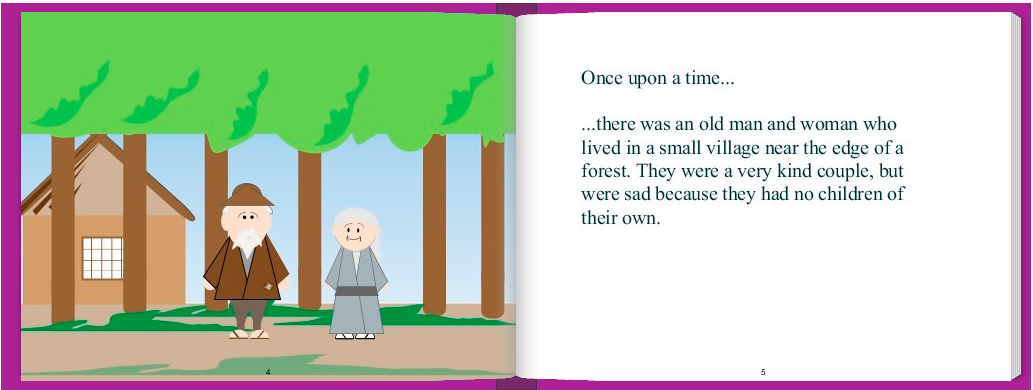
The graphics are a little crude, but that isn’t necessarily a drawback. The attempt (and the fear of potential failure) to achieve professional / polished work can be intimidating for students that aren't tech savvy. That anxiety stifles students’ creativity in my opinion. A sloppy looking platform gives students the freedom to get past the details and into the meat of the learning objective. Additionally, the interface of the program is simple and students will not be bogged down in the navigation or manipulation that can be common with products like Prezi.

StoryJumper Sample .png
Graphics from: www.storyjumper.com


The images available within the program lend themselves to fictional or fantastical tales; great for the younger audience. However, when needed students can supplement the library stock with uploaded images. As a result the application is useful to all grade levels.


The StoryJumper site is going to increase the learning and literacy skills of all grade levels (but not in the same way). Younger students will love working with graphic manipulatives in their story. It will encourage their creative instincts while they develop their 21st century skills including digital learning, critical thinking, decision making and communication. Older students will have fun with those features but also be cognitively ready to take advantage of the programs’ story development aids. The program offers stimulation to most learning types; tactile, logical, linguistic and spatial learners.


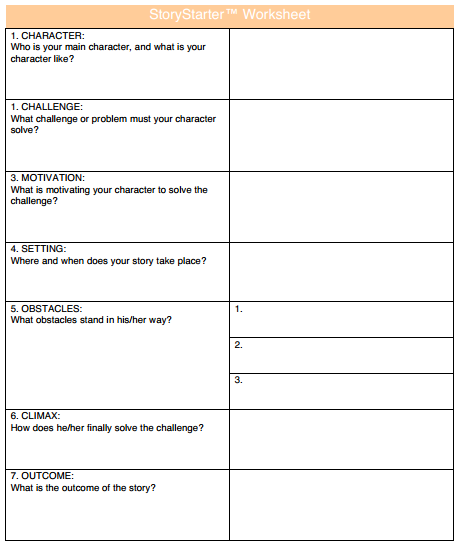
What I was most impressed with was the length to which the developers went to to make this website classroom ready. First, this website will work on any browser. That consideration isn't as important in Moore County, NC because we have great hardware in the hands of our students (HP Chromebooks), but it may be a relevant consideration for your LEA’s situation. Second, teachers’ accounts are free & they can set up “classroom” lists with students, usernames, and set time limits for in-class work (students have the option to create "at home" accounts to show their creation to their parents or work from home). Third, there is a one-click button that will create “getting started handouts” for each student with their personal log in information. Last but definitely not least, scaffolding and differentiation have been built into the program! Click on “Help” and find the link “download worksheet”. Seen below, the worksheet walks students through all the steps of character and story development.


TIP: If you are not in a one to one environment, students can complete story worksheets  & storyboards ahead of time to maximize time on task when you have hardware access.


Screenshot 2014-05-29 at 9.24.47 AM.png
Graphics from: www.storyjumper.com

I love this website and I can't wait to start using it in MCS classrooms next year. I see this fitting perfectly with our ELA, History, Foreign Language, and Science instruction. If you can think of anything else, put in the comments box below and share with our PLN. 

Read Graphite’s review here:

Read Common Sense Media’s review here: 


Will Herring
Digital Integration Facilitator
Moore County Schools
@WilliamHerrin16